
Track2Go LogoTrack2Go

Track2Go

A Git-inspired repository tracking system built with a custom CLI, backend API, and web interface for exploring repositories, commits, and issues.

Next.jsNode.jsMongoDBCustom CLIREST API

System Architecture

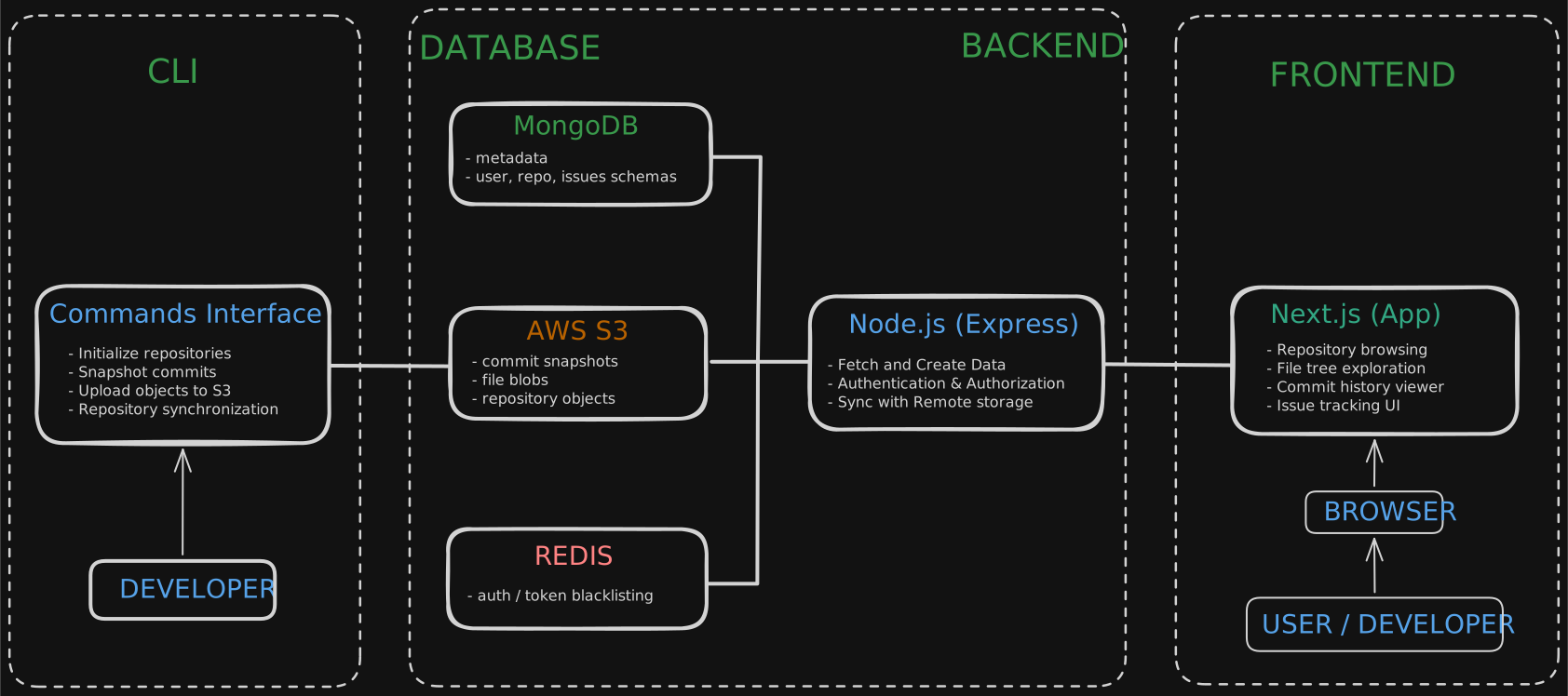
Track2Go consists of a CLI tool, backend services, and a web interface working together to manage repositories, commits, and issues. The CLI uploads commit snapshots to remote storage while the backend manages metadata and authentication.

Track2Go System Architecture

Try Track2Go Instantly

This demo environment contains repositories, commits, and issues so you can explore the system immediately without creating an account.

Demo Environment
Preloaded with sample repositories and activity.

Demo user

demo@track2go.dev

Password

demojohn

Demo environment • Data resets periodically

Track2Go CLI

Track2Go includes a CLI tool that allows repositories to be initialized and tracked directly from the terminal.

terminal

$ git clone https://github.com/Hrihsi-524/Track2Go

$ cd cli

$ npm install

$ npm link

$ track2go init

Track2Go Capabilities

Track2Go provides tools for exploring repository activity, tracking commits, and managing project discussions.

Repository Explorer
Browse repository file trees and project structure through an intuitive web interface.
Commit Tracking
View commit history and understand repository activity over time.
Issue Management
Track issues and discussions related to repository development.
CLI Integration
Initialize and interact with repositories using the Track2Go command line interface.

Challenges & Engineering Decisions

Track2Go was built as an experiment to understand how repository tracking systems work internally. Several design challenges shaped the final architecture.

CLI Architecture
The first implementation placed CLI commands inside the backend project. This meant it could only track the backend folder itself. The solution was to separate the CLI into an independent package and expose commands globally using a shebang script.
Recursive Repository Tracking
Early versions only tracked files in the root directory. Implementing a recursive walkDir() utility allowed Track2Go to index entire project structures similar to how Git scans repositories.
Remote Repository Storage
To simulate remote repositories, Track2Go needed a storage layer accessible from both CLI and backend. AWS S3 was used as an object store to represent remote repository data and synchronize repository state.
Cross-Platform File Paths
Windows paths return backslashes ( \ ) while web environments expect forward slashes. Path normalization was implemented to ensure repository data remains consistent across operating systems.

Track2Go was built as a learning project to understand how repository hosting systems manage files, commits, and remote synchronization.